Building Stateful Conversational Agents: A Guide to Google ADK, Spring Boot and Firestore
Master the architecture of stateful AI agents using the Google AI Agent SDK and Spring Boot. This guide provides a production-ready blueprint for implementing persistent agentic memory with Firestore and deploying scalable, containerized agents to Google Cloud Run while overcoming common infrastructure bottlenecks.
The Challenge of Stateful AI Agents
Implementing the AI Agent Pattern in the enterprise demands more than simple, stateless request-response cycles. To create a truly "agentic" experience, your system must maintain long-term memory and session continuity across complex, multi-turn interactions.
However, in distributed, serverless environments like Google Cloud Run or GKE, this creates a fundamental architectural conflict: How do you maintain stateful intelligence within stateless containers?
The solution lies in decoupling state from compute. By integrating a robust persistence layer like Firestore, you enable the agent to "remember" user context and tool execution history independently of the underlying infrastructure, ensuring resilience and scalability without being tethered to a specific server instance.
Community & Open-Source Contribution
Before diving into the details of this article, I want to acknowledge a significant personal inspiration. Reading the work of Guillaume Laforge and seeing the example he sets for the developer community motivated me to move beyond being a user and become a contributor to the Google Agent ADK open-source project.
"Leaders like Guillaume make it clear that Open Source Software isn’t just about code—it’s about community, collaboration, and making things better for everyone."
Thank you, Guillaume, for showing how positive impact is done and for making the open-source world a more welcoming place. Inspired by this spirit of collaboration, I developed the following solution to address the persistence gaps in the current SDK.
The Evolution of Production Persistence in Google ADK
While Google’s Java ADK is a powerful framework for building AI agents, early versions (prior to v1.0.0) relied heavily on default session management components that fell short of enterprise requirements:
- InMemorySessionService: Excellent for rapid prototyping and local demos, but lacks the persistence required for production. State is lost on every service restart, and it cannot scale horizontally across multiple container instances.
- VertexAiSessionService: Introduces significant architectural overhead by requiring a dependency on the "Reasoning Engine"—a managed service that is currently under-documented and adds unnecessary complexity for teams wanting to maintain control over their infrastructure.
To bridge this gap, the community needed a solution that was serverless, scalable, and natively integrated with the Google Cloud ecosystem. The resulting Firestore-backed session management FirestoreSessionService, which I designed and contributed, provides a clean, reliable middle ground that integrates seamlessly with Spring Boot or any standard Java environment.
- FirestoreSessionService: A robust, scalable implementation backed by Google Cloud Firestore
Why Firestore
Firestore is a scalable, managed, and widely-used Google Cloud nosql document database. It would provide a clear, simple, and robust set up for developers needing persistent sessions in production. Ease of Use: Enabling Firestore and configuring it in a Java language based application is a well-understood and simple process, unlike the current complexity of setting up a Reasoning Engine also known as Agent Engine.
The Strategic Value of Custom Storage: Control & Observability
Moving beyond InMemory or managed black-box services by implementing custom storage (like Firestore) provides two critical advantages for enterprise-grade AI agents:
- Data Sovereignty & Governance: By owning the storage layer, you retain full control over security rules, data retention policies, and regional residency. This ensures sensitive conversation history remains within your VPC and complies with organizational standards (HIPAA, GDPR, etc.) rather than relying on another provider's defaults.
- Radical Observability for Non-Deterministic Systems: AI agents are inherently non-deterministic. For production reliability, you must be able to audit exactly how an agent arrived at a specific response. Firestore allows you to persist the entire lifecycle—including granular tool calls, internal reasoning steps, and latent events—creating a rich audit log for debugging and continuous improvement.
- Serverless Economics & Cost Optimization: Managed "Reasoning Engines" often come with fixed costs or premium pricing. By leveraging a serverless, pay-per-use database like Firestore, you eliminate "always-on" infrastructure costs. Your expenses scale linearly with actual user sessions, making it the most cost-effective choice for fluctuating workloads
- Business Logic Extensibility: Custom storage isn't just a log; it’s an extension of your application logic. You can enrich session data with custom metadata (e.g., linking interactions to a Support Ticket ID), manage multi-modal context (storing images/files alongside text), or trigger real-time analytics the moment a specific agent event is persisted
Eliminate Google Service Account Keys
Enhance security by removing the need to store and manage static JSON keys. By leveraging Google
Cloud's
Workload Identity Federation with executable-sourced credentials, you can
securely authenticate without long-lived keys. Explore our
Workload Identity Federation
practical guide
to learn more.
Architecture, Implementation and Deployment
In the following sections, we will dive into the architecture and code snippets required to implement this pattern. We will specifically address common deployment challenges and how to overcome them using the Google AI Agent SDK (ADK) in a Java Spring Boot environment.
While the out-of-the-box ADK includes a basic runner and built-in server, these are primarily designed for local testing and rapid prototyping. To build a production-grade AI application, you must integrate the SDK with an enterprise framework and a robust persistence layer.
I initially attempted to utilize the VertexAiSessionService within Spring Boot; however, I encountered significant hurdles regarding the prerequisite configurations required for seamless integration. You can find my detailed analysis of these challenges in GitHub Issue #497 . This experience led me to develop the Firestore-based solution detailed below.
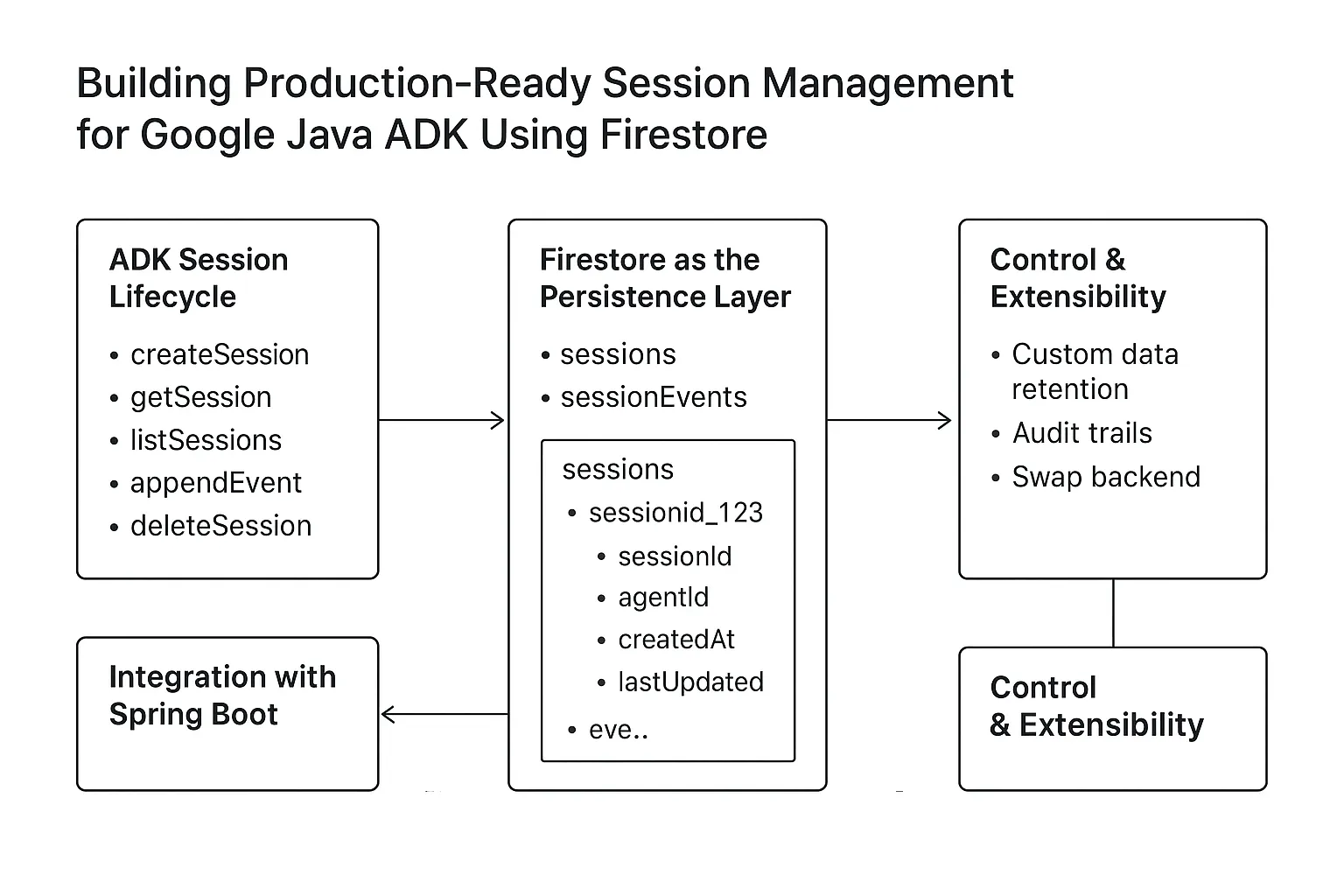
Here is the life cycle of Java AI SDK components:
Beyond Local Development: Resolving ADK Web Server & Dependency Conflicts on Cloud Run
Google Cloud Run is a managed serverless environment that allows only one process
to
bind
to the
assigned $PORT. When integrating the Google AI Agent SDK with Spring Boot, managing
this
single-port constraint is critical for a successful deployment.
google-adk-dev artifact and
transitive Spring dependencies from all your non-local builds. The
google-adk-dev module includes an internal ADKWebServer designed
specifically for local prototyping and the "Dev UI" experience. In a managed environment, this
internal
server competes with Spring Boot's embedded Tomcat for the single $PORT, leading to
port-binding conflicts and container health check failures. Furthermore, excluding transitive Spring
dependencies prevents version mismatches, ensuring your
Spring Boot starter maintains exclusive control over the application lifecycle.
While the ADKWebServer is an excellent tool for rapid local development, it is not
intended
for promotion to higher environments. To ensure production-readiness, your Spring Boot application
must serve as the sole entry point. The most robust approach is to use a wildcard
exclusion
in your Maven configuration to honor the Cloud Run environment settings.
<dependency>
    <groupId>com.google.adk</groupId>
    <artifactId>google-adk</artifactId>
    <version>1.5.0</version>
    <exclusions>
        <!-- 1. Prevent the ADK from bringing in its own Spring version -->
        <exclusion>
            <groupId>org.springframework</groupId>
            <artifactId>*</artifactId>
        </exclusion>
        <!-- 2. Explicitly remove the embedded dev server for Cloud Run -->
        <exclusion>
            <groupId>com.google.adk</groupId>
            <artifactId>google-adk-dev</artifactId>
        </exclusion>
    </exclusions>
</dependency>
Firestore-backed Session Service Persistence
To address the early session persistence limitations within the Google AI SDK, I developed the Firestore-backed session service, which is now natively integrated in ADK 1.0.0. This guaranteed persistent layer ensures that AI agent conversations remain stateful and resilient across service restarts.
Step 1: Configure Project Dependencies
First, add the necessary Firestore and Google AI SDK dependencies to your build configuration.
Below is the Maven dependency for your pom.xml file:
<dependency>
    <groupId>com.google.adk</groupId>
    <artifactId>google-adk-firestore-session-service</artifactId>
    <version>1.5.0</version>
</dependency>
Here is the complete pom.xml file:
<?xml version="1.0" encoding="UTF-8"?>
        <project xmlns="http://maven.apache.org/POM/4.0.0" xmlns:xsi="http://www.w3.org/2001/XMLSchema-instance"
            xsi:schemaLocation="http://maven.apache.org/POM/4.0.0 http://maven.apache.org/xsd/maven-4.0.0.xsd">
        <modelVersion>4.0.0</modelVersion>

        <groupId>com.example.agent</groupId>
        <artifactId>demo</artifactId>
        <version>1.0-SNAPSHOT</version>

        <properties>
            <maven.compiler.source>17</maven.compiler.source>
            <maven.compiler.target>17</maven.compiler.target>
        </properties>

        <dependencies>
            <dependency>
                <groupId>com.google.adk</groupId>
                <artifactId>google-adk</artifactId>
                <version>1.5.0</version>
            </dependency>
            <dependency>
                <groupId>com.google.adk</groupId>
                <artifactId>google-adk-firestore-session-service</artifactId>
                <version>1.5.0</version>
            </dependency>
        </dependencies>
</project>
Step 2: Initialize the Firestore Database Runner
The FirestoreDatabaseRunner is responsible for initializing the Firestore client
and providing a database instance for the session service.
package com.example.agent;

import com.google.adk.agents.RunConfig;
import com.google.adk.sessions.FirestoreSessionService;
import com.google.adk.events.Event;
import com.google.adk.runner.FirestoreDatabaseRunner;
import com.google.adk.sessions.Session;
import com.google.cloud.firestore.Firestore;
import com.google.cloud.firestore.FirestoreOptions;
import com.google.genai.types.Content;
import com.google.genai.types.Part;
import io.reactivex.rxjava3.core.Flowable;
import com.google.adk.agents.BaseAgent;
import com.google.adk.tools.Annotations.Schema;
import java.util.Map;
import java.util.Scanner;
import com.google.adk.agents.LlmAgent;
import com.google.adk.tools.FunctionTool;

import static java.nio.charset.StandardCharsets.UTF_8;

public class FirestoreCliRunner {

    public static void main(String[] args) {
        RunConfig runConfig = RunConfig.builder().build();
        String appName = "hello-time-agent";

          BaseAgent timeAgent = initAgent();
        // Initialize Firestore
        FirestoreOptions firestoreOptions = FirestoreOptions.getDefaultInstance();
        Firestore firestore = firestoreOptions.getService();


        // Use FirestoreDatabaseRunner to persist session state
        FirestoreDatabaseRunner runner = new FirestoreDatabaseRunner(
                timeAgent,
                appName,
                firestore
        );


        Session session = new FirestoreSessionService(firestore)
                .createSession(appName,"user1234",null,"12345")
                .blockingGet();

        try (Scanner scanner = new Scanner(System.in, UTF_8)) {
            while (true) {
                System.out.print("\nYou > ");
                String userInput = scanner.nextLine();
                if ("quit".equalsIgnoreCase(userInput)) {
                    break;
                }

                Content userMsg = Content.fromParts(Part.fromText(userInput));
                Flowable<Event> events = runner.runAsync(session.userId(), session.id(), userMsg, runConfig);

                System.out.print("\nAgent > ");
                events.blockingForEach(event -> {
                    if (event.finalResponse()) {
                        System.out.println(event.stringifyContent());
                    }
                });
            }
        }
    }

    /** Mock tool implementation */
    @Schema(description = "Get the current time for a given city")
    public static Map<String, String> getCurrentTime(
        @Schema(name = "city", description = "Name of the city to get the time for") String city) {
        return Map.of(
            "city", city,
            "forecast", "The time is 10:30am."
        );
    }

     private static  BaseAgent initAgent() {
        return LlmAgent.builder()
            .name("hello-time-agent")
            .description("Tells the current time in a specified city")
            .instruction("""
                You are a helpful assistant that tells the current time in a city.
                Use the getCurrentTime tool for this purpose.
                """)
            .model("gemini-2.5-flash")
            .tools(FunctionTool.create(FirestoreCliRunner.class, "getCurrentTime"))
            .build();
    }

}
Step 3: Run the Application
Run the application using the following command:
mvn clean compile exec:java -Dexec.mainClass="com.example.agent.FirestoreCliRunner"Step 4: Validate the output
After running the application, you should see the output as shown here: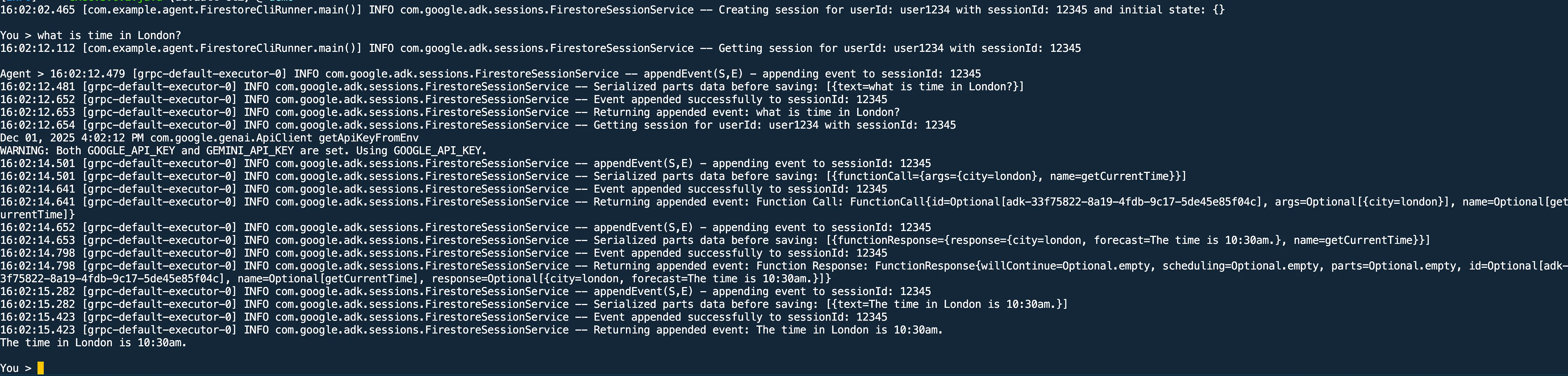
Step 5: Validate the Firestore Database
In firestore database, you should be seeing conversation being being populated as shown here, under user events collection the you will see documents representing conversations.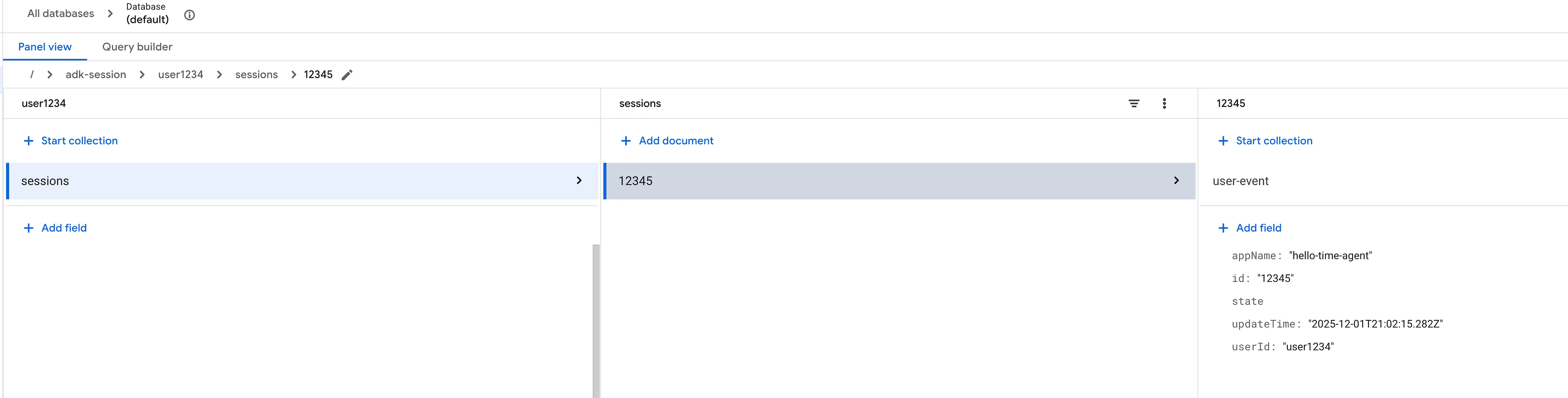 Each document contains details about the messages exchanged between the user and the agent,
including
tool
invocations and responses.
Each document contains details about the messages exchanged between the user and the agent,
including
tool
invocations and responses.
Step 6: Putting this all together to Google Cloud Run
To finalize our implementation, we will package the application as a container and deploy it to Google Cloud Run. This ensures our AI Agent is not only stateful (via Firestore) but also highly available and scalable.Repository github.com/mohan-ganesh/spring-boot-google-adk-firestore
Under the Hood: Architectural Implementation
The core logic of the application is encapsulated within the ChatController.java, which serves as the bridge between the Spring Boot REST layer and the Google ADK orchestration engine.
1. Request Orchestration & Initialization
When a POST request hits the /chat endpoint, the ChatController.java manages the lifecycle of the interaction.
- FirestoreDatabaseRunner: During bean initialization, we configure this
runner
with
the
WeatherAgent.java
and the
FirestoreFirestoreConfig.java instance. This runner acts as the "Stateful Engine," ensuring that every Large Language Model (LLM) turn is automatically persisted without manual database calls in your business logic.
2. Resilient Session Lifecycle
To maintain "Agentic Memory," the application implements a Get-or-Create pattern for user sessions:
- Retrieval:The system first attempts to fetch an existing session from
Firestore
using
sessionService().getSession(sessionId) - Reactive Recovery:If the session is missing (e.g., a new conversation), the
onErrorResumeNextblock catches theSessionNotFoundExceptionand transparently triggerssessionService().createSession(sessionId)to establish a new stateful context in Firestore.
3. Agent Execution & Autonomous Tool Calling
Once the session context is established, the execution moves to the ADK's reactive core:
- runAsync(...):This method invokes the Large Language Model (LLM) (Gemini) while injecting the historical session context
- Autonomous Tooling: If the Large Language Model (LLM) determines that a real-world action is required (e.g., calling getCurrentTime), the ADK handles the execution of the registered Function Tool autonomously, feeds the result back into the model's context, and continues the reasoning loop until a final response is generated.
4. Reactive Event Processing
The Google ADK returns a Reactive Stream of events. The controller is designed to:
- Filter the stream for content-bearing events.
- Extract the text parts from the multimodal response.
- Aggregate the stream into a cohesive final response for the client.
Step 6.1: Google Cloud Environment Setup
Before deploying, ensure the necessary APIs are enabled and your service account has the correct permissions to interact with Vertex AI and Firestore.
# Enable required Google Cloud APIs
gcloud services enable \
    aiplatform.googleapis.com \
    firestore.googleapis.com \
    run.googleapis.com \
    cloudbuild.googleapis.com \
    artifactregistry.googleapis.com

    # Grant required roles to your Service Account
# Note: roles/datastore.user is required for Firestore Native Mode access
gcloud projects add-iam-policy-binding [PROJECT_ID] \
    --member="serviceAccount:[SA_NAME]@[PROJECT_ID].iam.gserviceaccount.com" \
    --role="roles/aiplatform.user"

gcloud projects add-iam-policy-binding [PROJECT_ID] \
    --member="serviceAccount:[SA_NAME]@[PROJECT_ID].iam.gserviceaccount.com" \
    --role="roles/datastore.user"
Step 6.2: Automated Deployment with Cloud Build
The repository includes a cloudbuild.yaml file that automates the containerization and deployment process. This is the ideal choice for CI/CD, as it handles the Docker build and pushes the image to the Artifact Registry before deploying to Cloud Run. Run the following command from the project root:
gcloud builds submit --config cloudbuild.yaml .
Step 6.3: Validating the Deployment
Once the deployment is complete, Cloud Run will provide a service URL. You can explore the agent's capabilities using the built-in Swagger UI or by making a direct API call to the agent endpoint.
A sample output is shown here: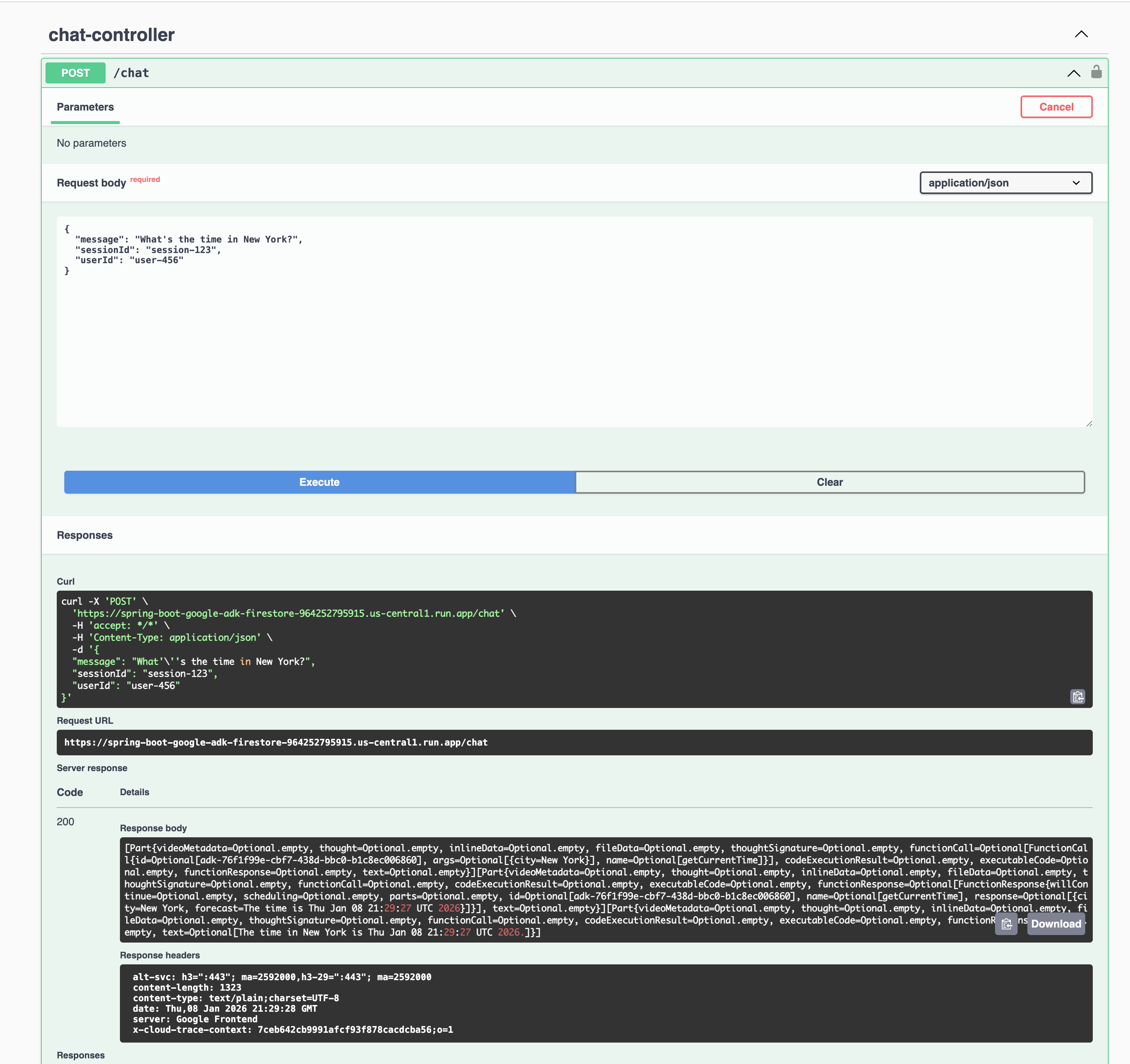
Conclusion
In this article, you have learned how to use the Google AI SDK to create a Java application that uses AI agents to store the conversation history in a Firestore database that can be used later for audit and analysis.
🚀 Ready to build more?
Now that you've seen the power of custom storage and observability, imagine applying these concepts to domain agents. Check out our guide on building enterprise grade applications with the MCP Client/Server Architecture also known as Domain Agents.
Implementation FAQ & Common Pitfalls
How This Works (Implementation Steps)
-
Configure Maven Dependencies
Add the Google Agent SDK and exclude development-only artifacts to ensure Cloud Run compatibility. -
Initialize FirestoreDatabaseRunner
Configure a thread-safe Firestore runner to manage session persistence across requests. -
Property Configuration
Define Firestore and GCS properties usingadk-firestore.properties. -
Execute the Application
Run the agent using Maven exec to start the stateful conversation loop. -
Data Verification
Verify persisted session data and events in the Firestore console. -
Deploy to Google Cloud Run
Package the application using Cloud Build and deploy it to a managed Google Cloud Run service with the correct IAM permissions.
Frequently Asked Questions
What is the advantage of Firestore over InMemorySessionService?
Firestore provides persistent state across service restarts and enables horizontal scaling across multiple Cloud Run instances, unlike in-memory session storage.
How do I deploy the Google AI Java SDK with Spring Boot on Cloud Run?
Exclude the google-adk-dev dependency to avoid port binding
conflicts,
as Cloud Run manages the runtime server and listening port.
Why is Firestore better for production AI agents?
Firestore supports distributed persistence, fine-grained security rules, audit logging, and operational resilience required for production systems.
What is Firestore Session Service?
Firestore Session Service is a session management service for the Google AI SDK that provides a robust, scalable implementation backed by Google Cloud Firestore. Setting up of widely-used Google Cloud nosql document database is as simple as adding a dependency and a configuration properties.