Implementing MCP Client-Server Architecture with Spring Boot & Google ADK
The Model Context Protocol (MCP) is an open standard that enables seamless, secure integration between Large Language Models (LLMs) and external data sources or services. This architecture solves the "N x M" integration problem by providing a universal interface. The MCP Client, integrated into the host application, orchestrates communication by translating model intents into standardized protocol requests. These requests are handled by MCP Servers, which expose specific capabilities—such as database operations or API integrations—allowing AI agents to interact with real-world systems with high reliability and modularity.
MCP Client-Server Architecture Diagram
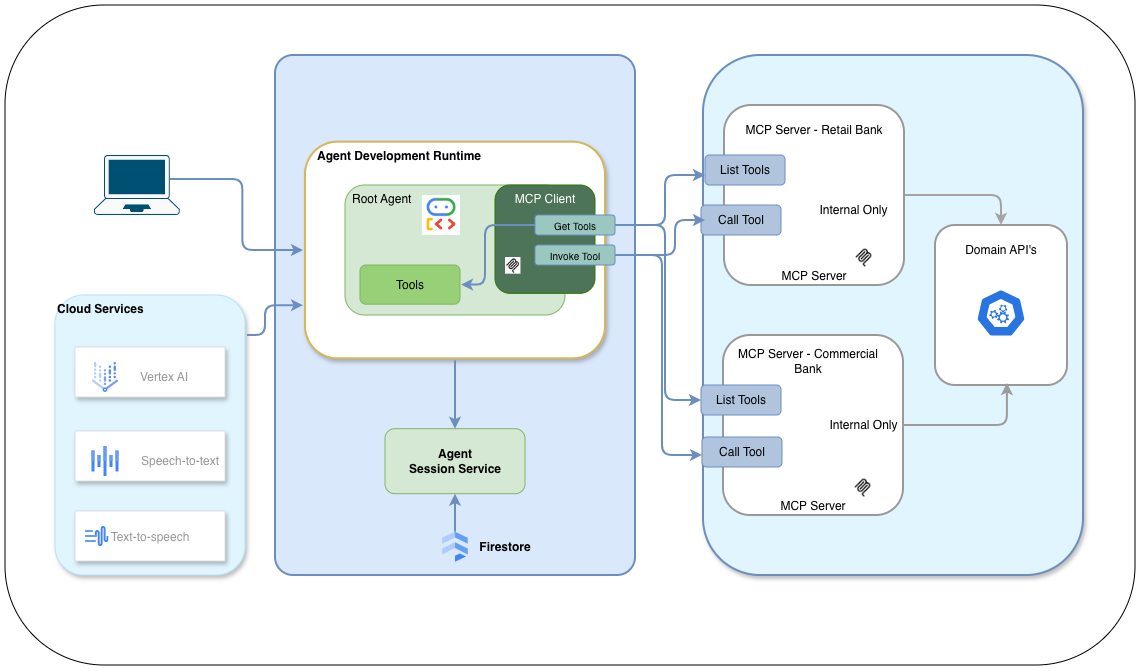
The MCP architecture is built upon four foundational pillars:
- MCP Host: The primary application (e.g., an AI IDE, a custom chatbot, or an enterprise dashboard) that initiates communication and provides the user interface.
- MCP Client: The orchestration layer within the host that manages multiple server connections, maintains protocol compliance, and routes intents from the LLM.
- MCP Server: Lightweight, reusable modules that encapsulate specific business logic or system integrations. In an enterprise setting, these can be managed as internal microservices, ensuring secure data access.
- Transport Layer: The underlying communication protocol. While MCP supports multiple transports (like STDIO for local tools), Server-Sent Events (SSE) is the preferred standard for distributed, cloud-native enterprise applications.
By leveraging this decoupled approach, developers can focus on building intelligent reasoning loops while maintaining a clean, scalable interface to their underlying infrastructure.
Practical Implementation: A Multi-Server Ecosystem
To demonstrate the protocol's flexibility, we will implement a reference architecture featuring three distinct modules:
- Client Host (MCP Orchestrator): Built using the Java ADK, this host processes natural language inputs and orchestrates calls to various servers. It utilizes an SSE-based transport layer for resilient, asynchronous communication.
- Billing MCP Server: A domain-specific server that exposes tools for payment authorization and transaction processing. It demonstrates how sensitive financial workflows can be encapsulated behind a standard interface.
- Email MCP Server: A utility server that provides a generic tool for automated notifications, taking recipients, subjects, and HTML bodies as parameters.
- Cloud Deployment (GCP): We will leverage Google Cloud Run to host these services as scalable, serverless containers. This setup also highlights the Java ADK's ability to integrate with voice capabilities like Speech-to-Text, providing a truly multimodal experience.
Repository github.com/mohan-ganesh/mono_mcp_client_server_adk.git
Upon cloning the repository, you will observe the following directory structure:
- mcp_cli_client
- mcp_billing_server
- mcp_email_server
1. Deploy the Email and Billing Servers
Begin by deploying the microservices to Google Cloud. From the root of the repository, navigate to the
mcp_email_server directory and execute the build:
gcloud builds submit .Upon successful deployment, Cloud Run will provide a unique HTTPS URL. Note these URLs, as they will be required to configure the client orchestrator.

Repeat this process for the mcp_billing_server folder and record the second URL.
2. Configure the MCP Client Orchestrator
The Java ADK provides the flexibility to swap persistence layers easily. Our example includes two client implementations:
McpCliClient: Persists conversation state to Google Firestore (recommended for production).McpCliClientInMemory: Stores state in local memory (ideal for rapid prototyping).
In the client configuration, update the mcpUrl string with the URLs you generated in
Step 1.
This enables the ADK to discover and invoke the tools across your distributed environment:
String mcpUrl = "https://mcp-billing-server-964252795915.us-central1.run.app/billing-domain-tools/sse,https://mcp-email-server-964252795915.us-central1.run.app/email-domain-tools/sse";
Note: Ensure that your GEMINI_API_KEY and Firestore service account
credentials
are correctly configured in your environment variables before launching the host application.
3. Launch the Application
Run the following command from the mcp_cli_client folder to start the interactive AI
session:
mvn clean compile exec:java -Dexec.mainClass="com.example.garvik.McpCliInMemoryClient"This implementation showcases the power of MCP: a single, intelligent client orchestrating disparate, domain-specific services to fulfill complex user requests.
ModelContext and the agent will automatically pick up the changes.
Orchestrating Tool Discovery and Sanitization
In a distributed environment, tools are discovered dynamically via the McpToolset. One critical challenge when using multiple MCP servers is ensuring that tool names comply with the Gemini API's strict naming requirements (which only allow alphanumeric characters, underscores, dots, and colons).
The following implementation pattern from the AdkClientBase.java#103-182
shows how to load tools via SSE
and automatically sanitize their names at runtime using reflection:
protected static List<BaseTool> getTools(String mcpServerUrl) {
    // 1. Configure SSE Parameters
    SseServerParameters params = SseServerParameters.builder()
        .url(mcpServerUrl)
        .headers(ImmutableMap.of("Authorization", "Bearer ****"))
        .build();

    // 2. Discover tools from the remote server
    McpToolset mcpToolset = new McpToolset(params);
    List<BaseTool> tools = mcpToolset.getTools(null).toList().blockingGet();

    // 3. Sanitize tool names for Gemini API compliance
    for (BaseTool tool : tools) {
        try {
            Field nameField = BaseTool.class.getDeclaredField("name");
            nameField.setAccessible(true);
            String originalName = tool.name();
            // Replace any non-compliant characters with underscores
            String sanitizedName = originalName.replaceAll("[^a-zA-Z0-9_.:-]", "_");
            if (!originalName.equals(sanitizedName)) {
                nameField.set(tool, sanitizedName);
            }
        } catch (Exception e) {
            logger.warn("Failed to sanitize tool name: " + tool.name(), e);
        }
    }
    return tools;
}
This pattern ensures that your agent remains resilient even if the underlying MCP servers use naming conventions that would otherwise cause the Gemini API to reject the tool definitions.
Enterprise Ready: OAuth-Based Tool Loading & RBAC
Your AI agent shouldn't just load all available tools from every server. Instead, you should leverage your existing Identity Provider (IdP) to implement Role-Based Access Control (RBAC). This ensures that a "Member" role only sees basic tools, while a "Manager" role might see sensitive administrative or financial tools.
The following implementation shows how to integrate Spring Security to extract the OAuth2 access token and conditionally load MCP tools based on the user's granted authorities:
@Service
public class SecuredMcpToolService {

    @Autowired
    private OAuth2AuthorizedClientService authorizedClientService;

    public List<BaseTool> loadAuthorizedTools(Authentication auth) {
        List<String> serverUrls = new ArrayList<>();

        // 1. Core Tools (Always Available)
        serverUrls.add("https://mcp-core-server.run.app/sse");

        // 2. Dynamic RBAC: Add tools based on OAuth2 Roles/Scopes
        if (auth.getAuthorities().stream().anyMatch(a -> a.getAuthority().equals("ROLE_MANAGER"))) {
            serverUrls.add("https://mcp-billing-server.run.app/sse");
        }

        // 3. Extract Bearer Token for downstream MCP authentication
        OAuth2AuthenticationToken oauthToken = (OAuth2AuthenticationToken) auth;
        OAuth2AuthorizedClient client = authorizedClientService.loadAuthorizedClient(
            oauthToken.getAuthorizedClientRegistrationId(),
            oauthToken.getName()
        );
        String accessToken = client.getAccessToken().getTokenValue();

        // 4. Load tools with the users identity context
        return serverUrls.stream()
            .flatMap(url -> AdkClientBase.getToolsWithToken(url, accessToken).stream())
            .toList();
    }
}
By passing the Bearer Token in the SSE headers during the getTools
call,
your MCP servers can also perform their own fine-grained authorization, creating a secure,
end-to-end
Zero-Trust architecture for your AI ecosystem.
This pattern is essential for multi-tenant applications and enterprise security, ensuring that the LLM only ever "sees" the tools that the current user is authorized to use, significantly reducing the surface area for logic errors.
Ready to explore the next part of the MCP journey?
Check out the guide on Building
a
Voice MCP Client Server Orchestration to see how to use MCP with voice and chat.