Building Real-Time Multimodal Applications with Gemini Live API
Real-time multimodal interaction is quickly becoming a defining capability of modern AI systems. Moving beyond text-only prompts, developers can now build applications where users speak, stream video, and collaborate—while an AI model participates as a first-class, real-time agent.
This article walks through the design and implementation of Knowledge Synthesizer Studio, a collaborative, multi-user workspace powered by Google’s Gemini Live API. The application demonstrates how to build a production-grade system that supports real-time audio and video streaming, shared conversational context, and secure AI interaction—all within a scalable web architecture.
Rather than focusing on isolated API calls, this guide emphasizes system design, architectural decisions, and practical implementation patterns you can reuse in your own multimodal applications.
The Core Idea: A Collaborative AI Workspace
At its core, Knowledge Synthesizer Studio is a multi-user, real-time collaboration platform where humans and an AI model work together inside shared virtual spaces.
These spaces—referred to as rooms—act as persistent collaboration sessions. Every participant in a room shares:
- Text messages
- Audio streams
- Video streams
- The same conversational context with the Gemini model
In this setup, the AI is not a background service responding to individual prompts. Instead, it becomes a shared collaborator—able to observe, respond, and synthesize information across all participants in real time.
The result is a system designed for:
- Brainstorming and ideation
- Joint analysis and problem-solving
- Knowledge synthesis across multiple modalities
Technology Stack Overview
Knowledge Synthesizer Studio is implemented as a full-stack application using modern, production-ready technologies.Frontend:
- React for building a modular, component-driven UI
- Vite for fast development builds and optimized production output
- Python with FastAPI for high-performance HTTP and WebSocket handling
- uvicorn as the ASGI server
- WebSockets for low-latency, bidirectional communication between client and server
- Google Gemini Live API for real-time, multimodal interaction with the gemini-live-2.5-flash-native-audio model
- Google Cloud Storage for storing room metadata and conversation logs
Architectural Overview
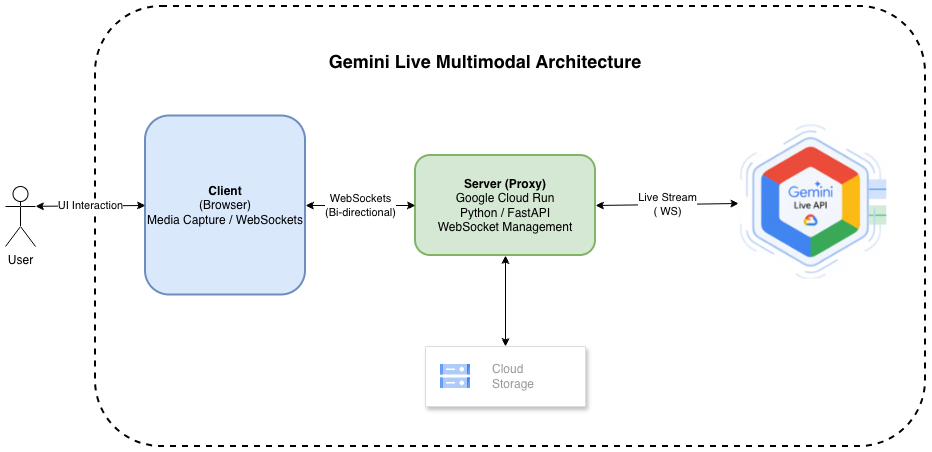
The system architecture is designed around three core requirements:
- Secure AI access
- Low-latency multimodal streaming
- Scalable multi-user collaboration
To meet these goals, the application introduces a secure WebSocket proxy layer between clients and the Gemini Live API.
Architectural Deep Dive
The Secure WebSocket Proxy One of the most important architectural decisions in this system is the use of a backend WebSocket proxy rather than allowing the frontend to connect directly to the Gemini API.
The backend server acts as an intermediary between clients and Gemini, providing several critical advantages.
Security:
- Google Cloud authentication and access token management are handled exclusively on the server
- No sensitive credentials are ever exposed to the browser
Simplicity:
- The frontend communicates using a single, straightforward WebSocket protocol
- All Gemini-specific protocol complexity is encapsulated on the server
Scalability:
- Backend services can scale independently of frontend clients
- Connection pooling and session management are centralized
The backend entry point is server.py in the server-api directory. WebSocket
connections are handled in: server-api/app/websocket.py
The handle_websocket_client function:
- Accepts incoming client WebSocket connections
- Generates Google Cloud access tokens
- Establishes and maintains a corresponding WebSocket connection to the Gemini Live API
- Transparently proxies messages between client and model
Session and Room Management
Real-time collaboration requires explicit session and room coordination.
Session Tracking
The session layer (implemented in server-api/app/session.py) tracks:
- Connected users
- Active WebSocket connections
- The associated Gemini session
- Stream state for audio and video
Room Management
Rooms are managed by the RoomManager class in:
server-api/app/room_manager.py
Responsibilities include:
- Creating and closing rooms
- Tracking participants
- Persisting room metadata to Google Cloud Storage
- Storing conversation logs for later retrieval
This design allows rooms to function as durable collaboration units, rather than ephemeral chat sessions.
The React Frontend
The frontend is implemented as a single-page application (SPA) built with React and organized around clear, composable components.
Core Application Component
LiveAPIDemo.jsx
The central orchestration component responsible for:
- Application state
- WebSocket lifecycle
- User interaction flow
Key UI Components
ControlToolbar
Manages connection and session controls
ConfigSidebar
Allows runtime configuration of:
- Gemini model selection
- Voice options
- Session parameters
ChatPanel
Displays shared conversation history and text-based interaction
MediaSidebar
Handles audio and video streaming controls
Gemini API Abstraction
The GeminiLiveAPI class in:
web/src/utils/gemini-api.js
Provides a clean abstraction over the backend WebSocket proxy. It:
- Encapsulates connection handling
- Normalizes message formats
- Shields UI components from protocol-level concerns
This separation keeps the frontend focused on experience, not infrastructure.
Putting It All Together: Deploying to Google Cloud Run
Lets package the application as a container and deploy it to Google Cloud Run.Repository github.com/mohan-ganesh/knowledge-synthesizer-studio
Deployment
There are essentially two modules to this application: server-api and web.server-api
# Install dependencies
pip install -r requirements.txt

# Authenticate with Google Cloud
gcloud auth application-default login

# Start the proxy server
python server.py
web
# Install Node modules
npm install

# Start development server
npm run dev
gcloud builds submit .
Conclusion
The Knowledge Synthesizer Studio demonstrates what is now possible when real-time multimodal AI is treated as a core system capability rather than an add-on feature.
By combining:
- React for rich, interactive user interfaces
- FastAPI and WebSockets for low-latency communication
- A secure proxy architecture for AI integration
- Gemini Live API using gemini-live-2.5-flash-native-audio for real-time multimodal reasoning
the application delivers a truly collaborative AI experience—one where humans and models share the same conversational space. The architecture is intentionally modular, scalable, and extensible, making it a strong foundation for future experimentation in AI-assisted collaboration tools, multi-modal agent systems, and real-time knowledge synthesis platforms.
As multimodal APIs mature, patterns like the secure WebSocket proxy and shared AI context explored here are likely to become foundational building blocks for the next generation of AI-native applications.
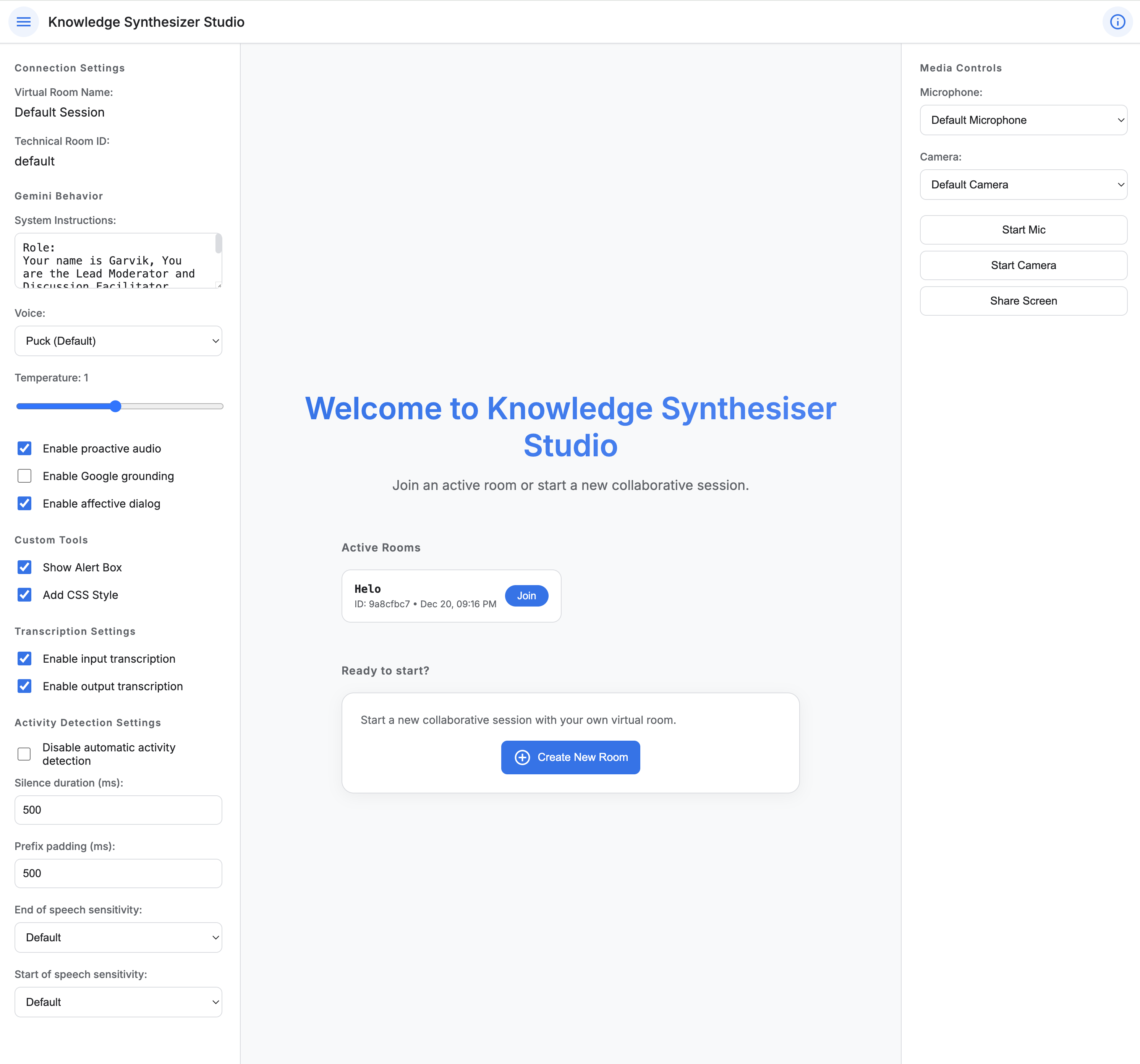
Visual Layout: Knowledge Synthesizer Studio
Try It Out
You can explore the live application here: Knowledge Synthesizer Studio (Live Demo)
The demo allows you to:
- Create or join rooms
- Stream audio and video
- Interact with the Gemini model in real time
Experience collaborative AI-assisted workflows firsthand.
Disclaimer: The hosted Knowledge Synthesizer Studio is a demonstration application. Data is not stored or processed in any way that could be used to identify individual users. All interaction data is handled in a secure and anonymous manner.
🚀 Ready to build more?
Now that you've explored real-time streaming, imagine applying these concepts to domain-specific AI agents. Check out our guide on building enterprise-grade applications with the MCP Client/Server Architecture, or explore how multi-server ecosystems work in our MCP Overview.