Programmatic Approaches to Federated Identity Token Exchange
How can a workload/application/service prove its identity to an external system — without VPNs, without static credentials, and without private network connectivity?
Modern platforms issue cryptographically verifiable identity tokens to workloads at runtime. The question is no longer how to authenticate, but how to securely exchange that identity for access across trust boundaries.
In this article, we explore the architectural patterns behind federated identity token exchange — using Google Cloud as a practical example — and show how to eliminate long-lived credentials entirely.
What is Identity Token Exchange?
Identity Token Exchange is a powerful pattern that allows workloads running in one cloud or environment to securely authenticate with another — without long-lived credentials, without shared secrets, and without complex network configurations. It is the missing link that enables true cross-cloud trust in a Zero-Trust world.
At its core, Identity Token Exchange is a pattern that allows a workload running in one
environment to securely authenticate with another — without long-lived credentials, without shared
secrets, and without complex network configurations. It is the missing link that enables true
cross-cloud trust in a Zero-Trust world.
Most teams fall back to:
- Static API keys
- Basic auth credentials
- Long-lived OAuth tokens
In Practice
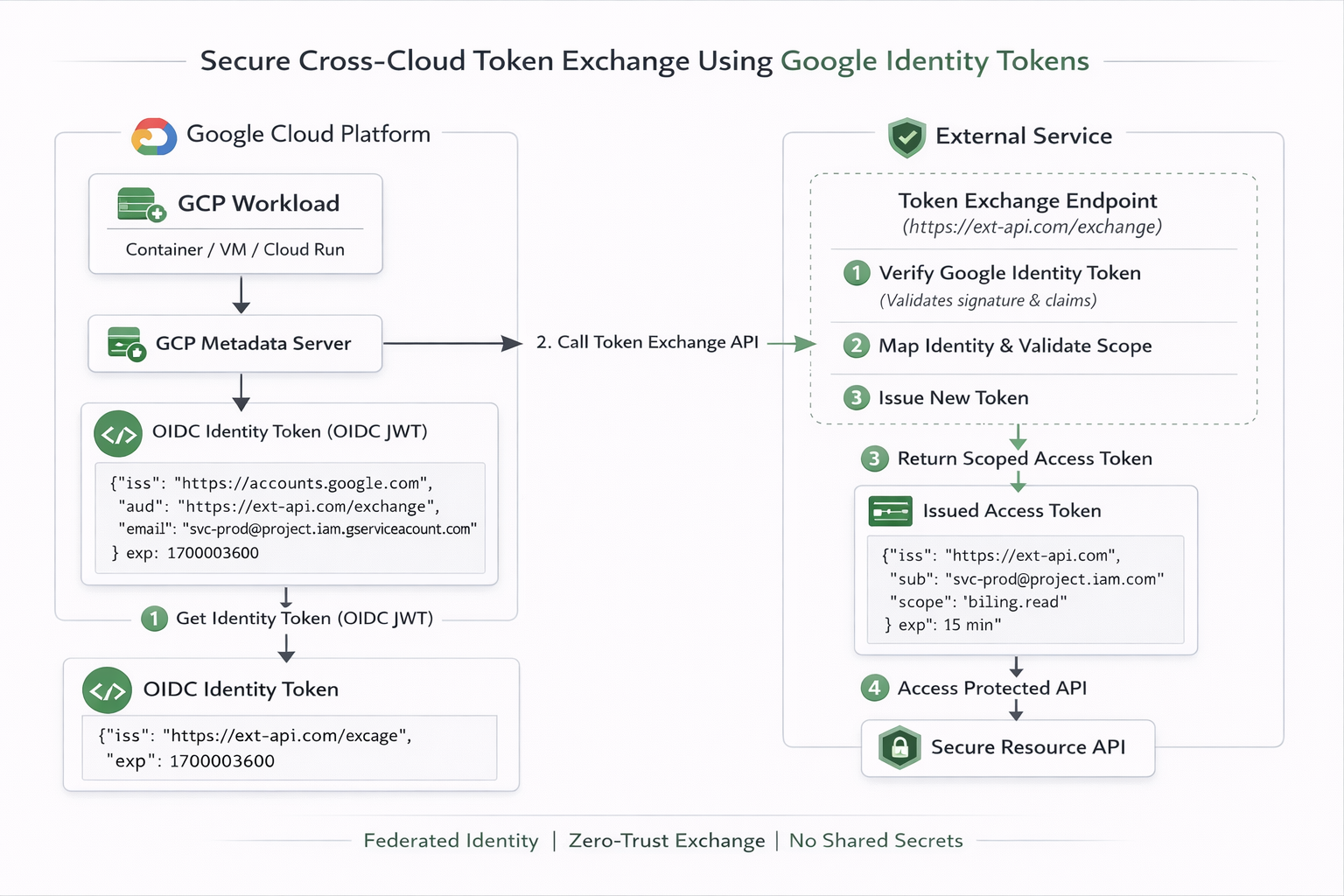
Lets walk through a practical example of how this works in practice, with a focus on Google Cloud Identity Token Exchange.
The Initial Passport
The first step is to obtain an identity token from Google Cloud Metadata Server.
    gcloud auth print-identity-token \
    --impersonate-service-account="<service-account>@<project-id>.iam.gserviceaccount.com" \
    --audiences="https://garvik.dev/exchange" \
    --include-email
This command returns a JWT that looks like this with decoded payload:
{
    "aud": "https://garvik.dev/exchange",
    "azp": "118259023059428830872",
    "email": "<service-account>@<project-id>.iam.gserviceaccount.com",
    "email_verified": "true",
    "exp": "1771785668",
    "iat": "1771782068",
    "iss": "https://accounts.google.com",
    "sub": "118259023059428830872",
    "alg": "RS256",
    "kid": "d275407c39e8036aa735eb2c17c548761ced6a64",
    "typ": "JWT"
}
This token is:
- Cryptographically signed
- Publicly verifiable
- Audience-bound
- Short-lived
- Non-reusable outside intended endpoint
The Exchange Pattern
Your GCP app takes that raw JWT string and makes an API call to your external service. It usually passes it in the Authorization header.
POST /exchange HTTP/1.1
Host: garvik.dev
Authorization: Bearer eyJhbGciOiJSUzI1NiIs...[rest_of_GCP_JWT]...
Content-Type: application/json

{
  "grant_type": "urn:ietf:params:oauth:grant-type:token-exchange",
  "requested_resource": "customer_database"
}
The external system performs:
- Validate JWT signature using Google public keys
- Verify
iss = https://accounts.google.com - Verify
aud = https://garvik.dev/exchange - Validate service account email against whitelist
- Map identity to internal authorization model
Eliminate Google Service Account Keys
Enhance security by removing the need to store and manage static JSON keys. By leveraging Google
Cloud's
Workload Identity Federation with executable-sourced credentials, you can
securely authenticate without long-lived keys. Explore our
Workload Identity Federation
practical guide
to learn more.
What Should the External System Return?
The external system should return a short-lived access token that the GCP app can use to access the requested resource.
Option 1: Another Access Token (The Standard API Pattern)
If the resource you want to consume is an external REST API (e.g., a SaaS platform, a payment gateway, or a microservice managed by another company), garvik.dev will return an OAuth Access Token.
{
  "access_token": "ey12345...[ACO_SYSTEM_TOKEN]...",
  "token_type": "Bearer",
  "expires_in": 3600
}
Your GCP app discards the Google token and uses this new GARVIK_SYSTEM_TOKEN to make standard API calls to the target resource. This is how platforms like Okta, Auth0 handle identity federation.
Option 2: Short-Lived Cloud Credentials (The AWS/Azure Pattern)
Let's say your GCP app needs to upload a file to an Amazon S3 bucket. You do not want to store AWS Access Keys in GCP. Instead, garvik.dev (acting as an AWS Identity Provider) exchanges your GCP token for temporary AWS credentials using AWS STS (Security Token Service).
{
  "AccessKeyId": "ASIA...XYZ",
  "SecretAccessKey": "wJal...789",
  "SessionToken": "IQoJb...[long_token]...",
  "Expiration": "2026-02-22T13:00:00Z"
}
Your GCP app can now initialize the standard AWS SDK using these temporary credentials. They will automatically self-destruct in an hour. If a hacker steals them, they are useless shortly after.
Option 3: Dynamic Basic Auth/Database Credentials (The HashiCorp Vault Pattern)
What if your GCP app needs to connect to an old PostgreSQL database hosted outside GCP that only understands usernames and passwords? garvik.dev (acting like a secret broker, such as HashiCorp Vault) verifies your GCP token, connects to the Postgres database, creates a brand new user with a random password on the fly, and returns it to you.
{
  "db_endpoint": "postgres.aco.internal:5432",
  "username": "gcp_backend_temp_user_99182",
  "password": "SuperSecretRandomPassword123!",
  "ttl": "1h"
}
Your app uses standard basic auth (postgresql://user:pass@host/db) to connect to the database. After 1 hour, aco.com logs into the database and deletes that user. No static passwords exist anywhere!
Option 4: A Static API Key (The Legacy Integration Pattern)
Sometimes, the external system is rigid. It requires a static, never-expiring API key (like a Stripe API key or a legacy vendor key), but you don't want to hardcode that key into your GCP application's source code or environment variables.
{
  "x-api-key": "live_v1_9876543210abcdef"
}
You use the secure, dynamic OIDC token to "fetch" the static API key at runtime. Your app holds it in memory, uses it to call the legacy resource, and if your GCP server crashes and reboots, it simply fetches it again.
Security Controls You Must Enforce
With this pattern, you must enforce the following security controls:- Enforce strict audience validation
- Whitelist service accounts explicitly
- Keep external tokens ≤ 15 minutes
- Log all exchanges
- Rate-limit exchange endpoint
- Never accept generic Google OAuth access tokens
This Pattern Is Appropriate When
You would use this pattern when:- You operate across cross cloud providers (GCP, AWS, Azure, etc.) but real private connectivity is not feasible
- You need zero-trust service-to-service communication
- You want to eliminate static secrets entirely
The Bigger Architectural Shift
Security architecture is evolving away from credential storage. Modern systems rely on:- Federated identity
- Short-lived assertions
- Token exchange
- Explicit trust boundaries
- Without exporting secrets.
- Without private networking.
- Without static keys.